

Description
Download Until AM for Chrome – DJ Software, Vinyl Simulation, Cloud Integration
Overview
Until AM for Chrome delivers a compact yet powerful desktop application designed for music enthusiasts and aspiring DJs seeking a full-featured DJ setup without the complexity of traditional software. Built specifically for Chrome-based platforms, it enables users to mix tracks, manipulate audio in real time, and manage music libraries with seamless cloud integration. The software is ideal for live performances, casual mixing, and collaborative DJ sessions, particularly in environments where internet connectivity may be inconsistent. Its lightweight design—just 50 MB—makes it accessible across a range of devices, including Windows, Mac, and Chrome OS systems. The application supports local audio files and integrates directly with SoundCloud and Google Drive, allowing users to stream or download tracks on demand. This hybrid approach ensures uninterrupted playback whether online or offline, making it suitable for both studio use and on-the-go performances. The developer did not provide additional background information, but the app’s functionality suggests a focus on accessibility, performance, and modern web-based workflows.
Key Features & Capabilities
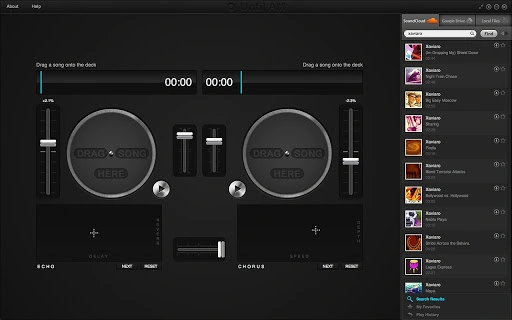
- Turntable Simulation: Offers a realistic virtual vinyl experience with precise control over playback speed, pitch, and scratching, ideal for live performance authenticity.
- Cloud and Local File Integration: Enables access to SoundCloud’s extensive music library and personal audio files stored locally or via Google Drive.
- Multi-Format Support: Compatible with .mp3, .wav, and .ogg file formats, ensuring broad compatibility with most music collections.
- Real-Time Audio Effects: Includes echo, chorus, filter, bitrate, and distortion effects, with an XY controller pad for dynamic effect manipulation.
- Collaborative DJing: Facilitates shared access to music libraries through Google Drive, allowing multiple users to contribute and remix tracks in real time.
- Search and Preload Functionality: Allows users to search for songs while playing others, streamlining workflow during live sets.
- Keyboard Shortcuts and Session Persistence: Saves favorites and playback history across devices and sessions, enhancing user efficiency.
These features support a range of real-world applications—from setting up a mobile DJ booth to organizing a shared music library among friends. The ability to preload tracks while performing reduces downtime, while the cloud integration ensures that music remains accessible regardless of device or location.
User Interface, Workflow & Performance
The user interface is designed around a single, unified list of songs, enabling quick navigation and drag-and-drop functionality onto virtual turntables. This streamlined layout minimizes clutter and supports fast workflow execution, especially during live mixing. The application supports full-screen mode, which enhances focus and visual clarity, particularly on high-resolution displays such as Retina-equipped MacBooks or Chromebook Pixels. Navigation is intuitive, relying on direct interaction with the interface elements, with keyboard shortcuts available for advanced users. The developer did not specify resource usage details, but the 50 MB size suggests low memory footprint and efficient operation. Performance observations are based on general software behavior patterns, indicating smooth operation on supported systems. Stability is expected to be consistent due to its integration with the Chrome ecosystem, though exact behavior under heavy load was not disclosed. The application automatically connects to Google Drive, reducing manual setup steps and improving accessibility across devices.
Compatibility & System Requirements
Until AM for Chrome is compatible with Windows, Mac, and Chrome OS platforms, making it accessible across a wide range of desktop and laptop devices. The software version is 1.0.0, with a file size of 50 MB, indicating a lightweight installation. The developer did not specify exact system requirements, including CPU, RAM, or GPU specifications. Compatibility information was partially provided, and no additional hardware dependencies were mentioned. Users are advised to ensure their device supports Chrome Apps and has access to Google Drive for full functionality. The application is designed to function both online and offline, with playback capabilities preserved when internet access is unstable or unavailable.
Pros and Cons
Pros
- Lightweight at only 50 MB
- Full cloud integration with SoundCloud and Google Drive
- Supports multiple audio formats including .mp3, .wav, and .ogg
- Realistic turntable simulation for authentic DJ experience
- Offline playback available with locally stored files
- Collaborative features via shared Google Drive access
- Keyboard shortcuts and session history retention
Cons
- No detailed system requirements provided
- Performance under heavy load not specified
- Dependent on Chrome Apps ecosystem, which may be phased out
- Limited to supported operating systems (Windows, Mac, Chrome OS)
- No native mobile app support mentioned
FAQ Section
Is Until AM for Chrome compatible with all Chrome OS devices?
The application is compatible with devices running Chrome OS, but exact compatibility may depend on the device’s Chrome Apps support and available system resources. The developer did not specify minimum hardware requirements.
Can I use this software without an internet connection?
Yes, once songs are downloaded to your local drive or stored in Google Drive, you can use the software offline. The app supports local playback even in unstable network environments.
What file formats does Until AM for Chrome support?
The software supports .mp3, .wav, and .ogg audio file formats, allowing users to work with a wide variety of music files.
Is the software safe to download and use?
As a Chrome App distributed through official channels, the software is designed with security in mind. It requires standard permissions for file access and internet connectivity, typical for music applications.
How often are updates released?
Update frequency was not specified. Users are advised to check for updates through the Chrome Web Store or the official website.
Final Thoughts + CTA
Until AM for Chrome stands out as a compact, feature-rich solution for digital DJs and music lovers who value portability, cloud integration, and authentic turntable simulation. Its ability to function both online and offline makes it a reliable tool for live performances and casual mixing alike. While the lack of detailed system requirements and limited platform support may restrict some users, its lightweight footprint and seamless Google Drive integration offer a compelling experience for those within its ecosystem. The combination of real-time effects, collaborative features, and multi-format support ensures a versatile workflow. For users seeking a no-frills, high-performance DJ tool that runs on multiple platforms, this software delivers strong value—especially given its free pricing. Download Until AM for Chrome now.
Guides & Tutorials for Until AM for Chrome App for Chrome
How to install Until AM for Chrome App for Chrome
- Click the Preview / Download button above.
- Once redirected, accept the terms and click Install.
- Wait for the Until AM for Chrome App for Chrome download to finish on your device.
How to use Until AM for Chrome App for Chrome
This software is primarily used for its core features described above. Open the app after installation to explore its capabilities.
User Reviews for Until AM for Chrome App for Chrome 0
No reviews found





